
Mark up PDF plans
Clouds, call-outs, text, highlights, stamps and coloured areas, on the same drawings your team uses.
TrueScale™ for Mac
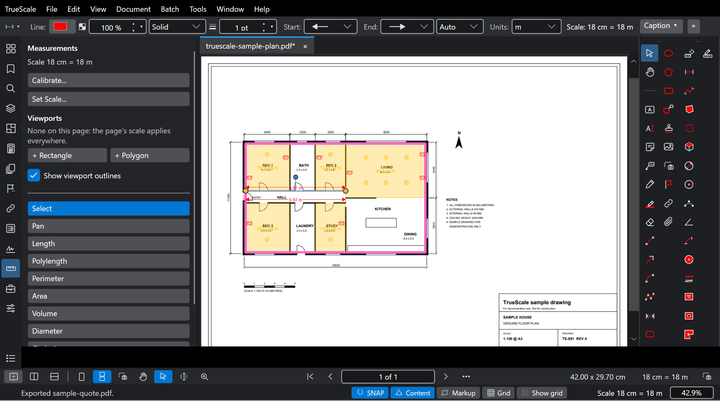
TrueScale is construction markup, takeoff and estimating software that runs natively on Apple silicon Macs. Open your PDF plans, set the scale, measure and count, and price the job.
Mac: Apple silicon (M1 or newer), macOS 14 or later. Intel Macs aren't supported yet.
Apple silicon
TrueScale for Mac is built for Apple silicon, M1 or newer, and runs on macOS 14 Sonoma or later.
Works without an internet connection once activated. A new licence is confirmed once in its first two months, online or with a code from your phone. After that it never needs the internet, and it checks the licence when it's next online. If it can't be confirmed in that time, TrueScale opens in view only until it is. Your files stay safe and readable.
Mac: Apple silicon (M1 or newer), macOS 14 or later. Intel Macs aren't supported yet.
Not on the Mac version yet: Printing (print from Preview after saving), OCR of scanned pages, sending email from TrueScale, spell check, and TrueScale Link for Excel. Excel export and import work on both.
One licence
One key, two PCs: use TrueScale on both your desktop and your laptop, Windows or Mac.
One purchase covers both: Windows and Mac use the same licence, with nothing extra to pay for the Mac version. An office PC and a MacBook, two Macs or two PCs, in any mix.
Mac: Apple silicon (M1 or newer), macOS 14 or later. Printing, OCR, email, spell check and Link for Excel aren't on Mac yet. What's different on Mac
Launch price $230 USD$349 AUD inc GST$454 NZD inc GST£202 GBP inc VAT€244 EUR inc VAT until 31 January 2027, then $329 USD$499 AUD inc GST$649 NZD inc GST£289 GBP inc VAT€349 EUR inc VAT. $329 USD$499 AUD inc GST$649 NZD inc GST£289 GBP inc VAT€349 EUR inc VAT, once.
What it does
Clouds, call-outs, text, highlights, stamps and coloured areas, on the same drawings your team uses.
Calibrate against a known dimension or pick the printed scale. Each measurement keeps its own scale, even a 1:20 detail on a 1:100 plan.
Lengths, polylengths, areas, perimeters, wall areas, volumes and counts, each one listed in the Markups List with its quantity.
The Markups List totals every quantity by subject. Add rates, build the estimate and export it to Excel.
Starter tool sets for builders and every trade in the Tool Shed. Change any tool, or build your own and share it with your team.
Cmd shortcuts, trackpad pinch to zoom and two-finger scroll, as you would expect on a Mac.
Trade tool sets
Every starter tool set comes with TrueScale for Mac, ready to change or replace with your own.
Mac questions
TrueScale for Mac is a native Apple silicon app: it runs on Macs with an M1 chip or newer, on macOS 14 or later. Intel Macs aren't supported yet.
Yes. One key, two PCs: use TrueScale on both your desktop and your laptop, Windows or Mac. One purchase covers both platforms.
macOS 14 Sonoma or newer (Sonoma, Sequoia and Tahoe are supported) on Apple silicon (M1 or newer), 8 GB of memory (16 GB recommended for large drawing sets) and about 500 MB of disk space, plus space for your drawings.
One edition with every feature. Includes free updates.
Mac: Apple silicon (M1 or newer), macOS 14 or later. Printing, OCR, email, spell check and Link for Excel aren't on Mac yet. What's different on Mac
Launch price $230 USD$349 AUD inc GST$454 NZD inc GST£202 GBP inc VAT€244 EUR inc VAT until 31 January 2027, then $329 USD$499 AUD inc GST$649 NZD inc GST£289 GBP inc VAT€349 EUR inc VAT. $329 USD$499 AUD inc GST$649 NZD inc GST£289 GBP inc VAT€349 EUR inc VAT, once.